NIMBUS Watch1.0.79
Publisher Description
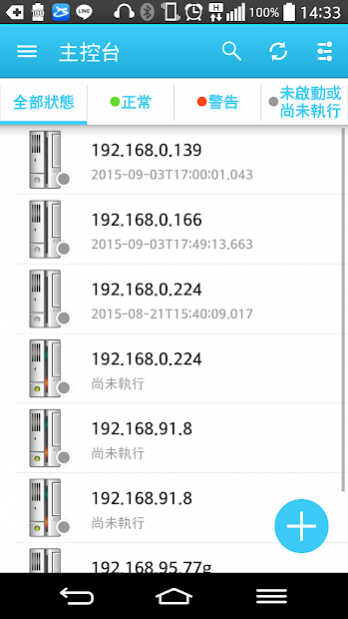
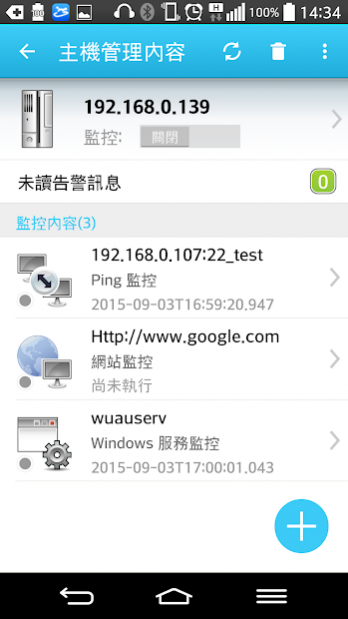
NIMBUS Watch是一套專業、即時的雲端監控管理系統,可以協助開發人員或管理人員即時掌握伺服器及各項系統服務的運作狀況,並即時發現與處理系統問題。
NIMBUS Watch提供的監控項目包含Ping, Port, Web Site, Windows Services, IIS Application pool, Windows Schedule, Event Log, SQL Server Connect, SQL Server Log File, SQL Server Job, SQL Server Data Lock, SQL Server Script Execution, Disk Size, Performance, User Defined Notification, Advanced Event Log, Advanced Performance, ODBC DSN Connect, Windows File Existence Time, Web Post, Ceph OSD Daemon, SNMP Disk Size, SNMP Performance, SNMP Network Traffic, IPMI Sensor, IPMI OS Boot, Zabbix alert, MySQL Connect, MySQL Schedule, MySQL Data Lock, MySQL Status, SMTP, Grafana, cAdvisor, User Define Push(Database) , User Define Push(ODBC) , User Define Push(TXT) , User Define Push(Mail), Web Test, Oracle Connect, Oracle Datafiles, Oracle Tablespace, Oracle Job, Oracle Lock, Oracle Script Execution, Oracle Script Execution, UNC Path Connect, Message Queue, Container Health Check, Windows Process等監控項目,目前總監控項目每位使用者以35個為限。
其中監控項目SQL Server Log File, SQL Server Job, SQL Server Data Lock, SQL Server Script Execution屬於SQL SERVER 2014監控模組;Windows Schedule, Advanced Event Log, Advanced Performance, Windows File Existence Time屬於WINDOWS SERVER2012R2監控模組;MySQL Connect, MySQL Schedule, MySQL Data Lock, MySQL Status屬於MySQL監控模組;Grafana, cAdvisor屬於Container監控模組;User Define Push(Database) , User Define Push(ODBC) , User Define Push(TXT) , User Define Push(Mail), Web Test屬於進階監控模組;Oracle Connect, Oracle Datafiles, Oracle Tablespace, Oracle Job, Oracle Lock, Oracle Script Execution屬於Oracle監控模組。
About NIMBUS Watch
The company that develops NIMBUS Watch is QUANTA Computer Inc.. The latest version released by its developer is 1.0.79.
To install NIMBUS Watch on your Android device, just click the green Continue To App button above to start the installation process. The app is listed on our website since 2020-12-07 and was downloaded 6 times. We have already checked if the download link is safe, however for your own protection we recommend that you scan the downloaded app with your antivirus. Your antivirus may detect the NIMBUS Watch as malware as malware if the download link to com.quantatw.nimbuswatch.camp is broken.
How to install NIMBUS Watch on your Android device:
- Click on the Continue To App button on our website. This will redirect you to Google Play.
- Once the NIMBUS Watch is shown in the Google Play listing of your Android device, you can start its download and installation. Tap on the Install button located below the search bar and to the right of the app icon.
- A pop-up window with the permissions required by NIMBUS Watch will be shown. Click on Accept to continue the process.
- NIMBUS Watch will be downloaded onto your device, displaying a progress. Once the download completes, the installation will start and you'll get a notification after the installation is finished.
Program Details
System requirements
Download information
Pricing
Version History
version 1.0.79
posted on 2020-12-07
1. 新增訊息佇列監控
2. 新增容器健康狀態監控
3. 新增Windows處理程序監控
4. 修正Bugs
version 1.0.56
posted on 2017-11-16
1.新增監控項目
MySQL連線監控
MySQL資料鎖定監控
MySQL工作排程監控
MySQL狀態監控
SMTP監控
2.Windows服務、IIS應用程式集區與Windows工作排程新增監控項目時支援多選
3.提供現有監控設定報表
4.修正Bugs
version 1.0.41
posted on 2017-01-08
1.新增監控項目,ODBC DSN連線監控,Windows檔案存在時間監控,Web Post監控,Ceph OSD Daemon監控,2.Windows事件檢視器監控【進階版】增加EventData的條件判斷,3.SQL Server 資料鎖定監控除原本鎖定時間外多加鎖定個數的判斷條件,4.修正Bugs
